
Last updated on
Nov 6, 2026
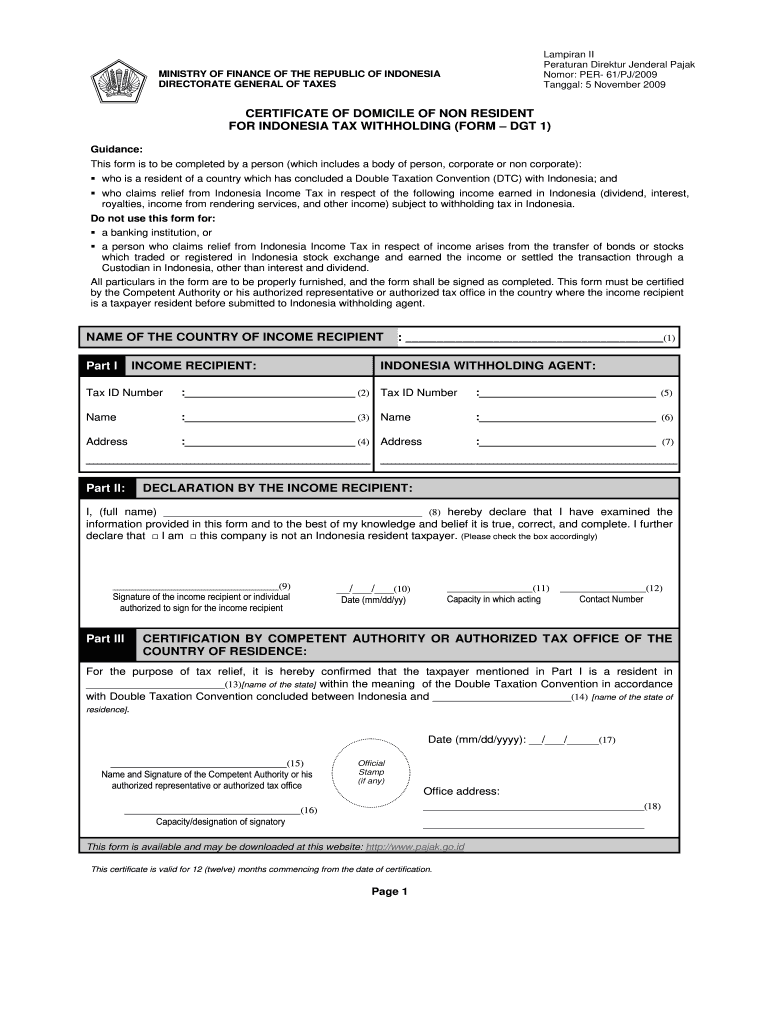
Indonesia DGT-1 2009-2026 free printable template
We are not affiliated with any brand or entity on this form

Fill out
Complete the form online in a simple drag-and-drop editor.

eSign
Add your legally binding signature or send the form for signing.

Share
Share the form via a link, letting anyone fill it out from any device.

Export
Download, print, email, or move the form to your cloud storage.
Why pdfFiller is the best tool for your documents and forms


End-to-end document management
From editing and signing to collaboration and tracking, pdfFiller has everything you need to get your documents done quickly and efficiently.
Accessible from anywhere
pdfFiller is fully cloud-based. This means you can edit, sign, and share documents from anywhere using your computer, smartphone, or tablet.
Secure and compliant
pdfFiller lets you securely manage documents following global laws like ESIGN, CCPA, and GDPR. It's also HIPAA and SOC 2 compliant.
What is Indonesia DGT-1
The Certificate of Domicile of Non Resident for Indonesia Tax Withholding is a tax document used by non-residents to claim relief from Indonesia Income Tax on income earned in Indonesia.
pdfFiller scores top ratings on review platforms




I just learnt about this online tool and it works great for me. I love the flexibility and the advantages it adds.
Very good. Took a little getting used to but, I think I did it.
Who needs Indonesia DGT-1?
Explore how professionals across industries use pdfFiller.

Indonesia DGT-1 is needed by:
-
Individuals earning income in Indonesia as non-residents
-
Foreign entities with business operations in Indonesia
-
Accountants assisting clients with tax exemptions
-
Tax professionals ensuring compliance with tax laws
-
Competent Authorities verifying certification for submissions
Comprehensive Guide to Indonesia DGT-1
What is the Certificate of Domicile of Non Resident for Indonesia Tax Withholding?
The Certificate of Domicile of Non Resident for Indonesia Tax Withholding (Form DGT 1) is a critical document in Indonesian tax regulations. It allows non-resident income recipients to clarify their tax obligations and rights under the Double Taxation Convention (DTC). This certificate is specifically utilized by individuals or entities that reside in countries that have a DTC with Indonesia.
This form holds significant importance as it reduces the instances of excessive taxation on non-residents earning income within Indonesia. Typically valid for a period of 12 months, the document must be signed by both the income recipient and an authorized party to be considered legitimate.
Purpose and Benefits of the Certificate of Domicile of Non Resident for Indonesia Tax Withholding
The primary purpose of the Certificate of Domicile is to facilitate tax relief options for non-residents. By utilizing this form, income recipients can claim exemptions outlined in the DTC, which helps mitigate the risk of being taxed more than necessary.
Some key benefits include:
-
Reduction of withholding tax rates applied to the income.
-
Legal backing to claim exemption from Indonesian income tax.
-
Protection against double taxation, promoting fair taxation practices.
This significant tool assists non-residents in navigating the complexities of Indonesian tax law.
Key Features of the Certificate of Domicile of Non Resident for Indonesia Tax Withholding
Understanding the features of the Certificate of Domicile is essential for accurate completion. The form requires specific information regarding the income recipient, including:
-
Name and address of the income recipient.
-
Type and amount of income being reported.
-
Details required for the competent authority’s certification.
The signing process is crucial, as both the income recipient and competent authority must provide their signatures to validate the submission. This document serves as an official Tax Exemption Certificate, confirming the residency status of the non-recipient.
Who Needs the Certificate of Domicile of Non Resident for Indonesia Tax Withholding?
This form is relevant for various individuals and entities, particularly those earning income from Indonesian sources. Eligible parties include:
-
Individuals residing in countries with a Double Taxation Convention with Indonesia.
-
Corporations or entities that derive income from their activities in Indonesia.
-
Freelancers and contractors working for Indonesian companies.
The necessity of the certificate arises in situations where income is sourced in Indonesia, ensuring compliant tax reporting and potential exemptions.
How to Fill Out the Certificate of Domicile of Non Resident for Indonesia Tax Withholding Online (Step-by-Step)
Filling out the Certificate of Domicile correctly is vital to avoid delays or rejections. Follow these steps to complete the form:
-
Access the online form through the designated platform.
-
Enter the personal information required in the designated fields, including name and address.
-
Specify the type of income and provide the necessary financial details.
-
Review the completed form for accuracy before submission.
-
Submit the form electronically and ensure you receive confirmation of submission.
Taking the time to carefully fill out this tax form can save you from potential complications.
Common Errors and How to Avoid Them When Filling the Certificate of Domicile of Non Resident
Submitting an inaccurate Certificate of Domicile can lead to rejection. Common errors include:
-
Missing signatures from the income recipient or competent authority.
-
Incorrect personal information such as name and address.
-
Omitting required income details.
To avoid these issues, always double-check the completion of every field and ensure that both parties sign the form correctly before submission.
Submission Methods and Where to Submit the Certificate of Domicile of Non Resident for Indonesia Tax Withholding
The submission of the Certificate of Domicile can be done through several methods. Options include:
-
Online submission via official tax portals.
-
Mailing the completed form to the appropriate tax authority.
-
Submitting in person at designated tax offices.
It’s essential to be aware of deadlines and the processing time, as timely submission is crucial for maintaining your tax exemption status.
Security and Compliance for the Certificate of Domicile of Non Resident for Indonesia Tax Withholding
Ensuring the security of personal information is paramount when completing the Certificate of Domicile. The process is designed with data protection in mind, featuring:
-
256-bit encryption for data safety.
-
Compliance with GDPR and privacy regulations.
-
Secure sharing and storing protocols to protect sensitive information.
User confidence is supported by the stringent controls in place for information handling during the form-filling process.
The Role of pdfFiller in Completing the Certificate of Domicile of Non Resident for Indonesia Tax Withholding
pdfFiller streamlines the process of completing the Certificate of Domicile for users. Key features include:
-
Ease of editing and filling out forms directly within the platform.
-
E-signature capabilities for efficient signing processes.
-
Options to share and manage tax exemption certificates seamlessly.
This platform simplifies the complexities of dealing with tax forms, making the experience user-friendly and efficient.
Next Steps After Submitting the Certificate of Domicile of Non Resident for Indonesia Tax Withholding
After submission, users should be aware of potential outcomes. Common post-submission actions include:
-
Receiving approval status of the Certificate.
-
Guidance on renewal processes if necessary.
-
Instructions on how to check the application status.
Staying informed about the status of your submission ensures effective management of your tax responsibilities.
How to fill out the Indonesia DGT-1
-
1.To access the Certificate of Domicile of Non Resident for Indonesia Tax Withholding form on pdfFiller, navigate to the website and use the search bar to find the form by its name.
-
2.Open the form by clicking on it in the search results, which will launch the pdfFiller editor interface.
-
3.Before filling in the form, gather all necessary information such as your name, address, type and amount of income earned in Indonesia, and details from the competent authority.
-
4.Begin filling in the required fields, starting with your personal details like 'Name' and 'Address'. Use the mouse or tab key to move between fillable fields.
-
5.If there are checkboxes to indicate specific conditions or agreements, click them to ensure they are marked appropriately.
-
6.Once you have completed all the fields, review the information carefully for accuracy to avoid any mistakes.
-
7.To finalize the form, ensure both the income recipient's and the competent authority's signatures are placed in the designated areas.
-
8.After everything is correct, save the document in your pdfFiller account, or download it to your computer in your preferred format.
-
9.If you need to submit the form, consider whether electronic submission is an option or prepare it for physical delivery as required.

Who is eligible to use the Certificate of Domicile of Non Resident?
Non-residents of Indonesia who earn income from sources within Indonesia and are from countries that have a Double Taxation Convention (DTC) with Indonesia are eligible to use this form.
Is there a deadline for submitting this form?
The Certificate of Domicile must be submitted prior to the income payment to ensure the application of tax relief. It is valid for 12 months from the certification date.
How do I submit the completed form?
You may submit the completed Certificate of Domicile to the income payer or competent authority, either through electronic means if allowed or by delivering a physical copy.
What supporting documents are required to complete this form?
Generally, you will need proof of residency in your home country, such as a passport or tax identification, as well as documentation supporting your income earned in Indonesia.
What are common mistakes to avoid when filling out this form?
Ensure that all personal information is accurate and legible. Missing signatures from either the income recipient or the competent authority can lead to rejection of the form.
How long does it take to process the Certificate of Domicile?
Processing times can vary, but it typically takes a few weeks to receive confirmation of the validity of the Certificate of Domicile once submitted to the competent authority.
Can I save the form in different formats on pdfFiller?
Yes, pdfFiller allows you to save your completed form in various formats, including PDF, which is commonly used for submission.
Related Content
Related Forms


Related Catalogs
Get the latest insights from our blog


If you believe that this page should be taken down, please follow our DMCA take down process
here
.
This form may include fields for payment information. Data entered in these fields is not covered by PCI DSS compliance.